O in short: Bulk PDF Watermark Creator is an affordable utility that automates the task of stamping one or more PDF documents with a watermark.well known
|
 Categories Categories |
|
|
|
|
|
Advanced Bulk PDF Watermark Creator 1.16 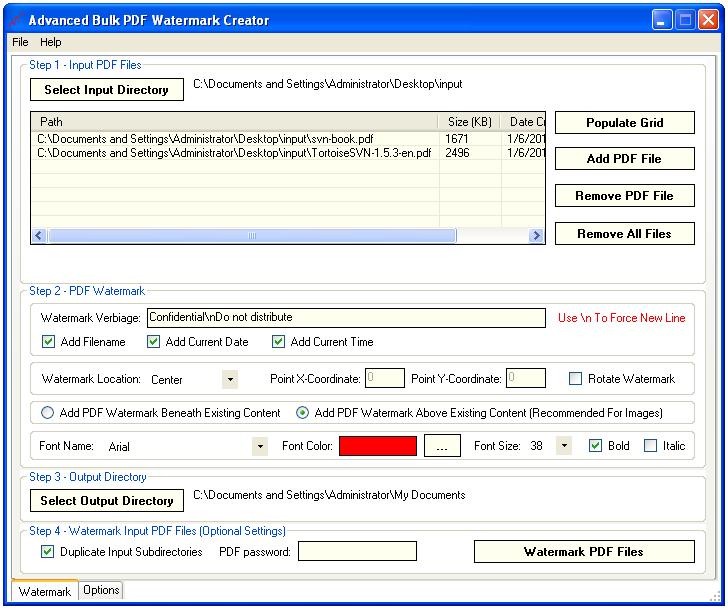
Click to enlargeDescription:Advanced Bulk PDF Watermark Creator automates the task of stamping one or more PDF documents with a watermark. The application automatically imports all PDF documents from a specific directory and all of its subdirectories. Alternatively, users can manually import PDF documents that need to be stamped with a watermark. For each imported input PDF document the application creates a watermarked copy of the original PDF file. Original PDF documents are not affected by the watermarking process. Advanced Bulk PDF Watermark Creator allows users to define the following watermark properties: single-line verbiage, multiple-line verbiage, font family, font color, font size, font style, rotation / no rotation, placement beneath / above existing PDF content. In addition to this, the application allows users to define multiple-line watermarks with the use of '\n' line separator, appends optional current file's name to the watermark verbiage, appends optional current date to the watermark verbiage, appends optional current time to the watermark verbiage and automatically persists most recently used directory paths and watermark settings.
 | Price $ 14.99 /

Purchase Advanced Bulk PDF Watermark Creator
Get it Now(to see additional options, click Buy Now) Type: Shareware File size: 1916 Kb Date: 01/06/2013 HomepageInstall support: Install and Uninstall OS: WinXP, WinVista, WinVista x64, Win7 x32, Win7 x64, Win2000, Windows2000, Windows2003, WinServer, Windows Vista Ultimate, Windows Vista Ultimate x64, Windows Vista Starter, Windows Vista Home Basic, Windows Vista Home Premium, Windows Vista Business, Windows Vista Enterprise, Windows Vista Home Basic x64, Windows Vista Home Premium x64, Windows Vista Business x64, Windows Vista Enterprise x64 System requirements: Microsoft .Net Framework 2.0 Language: English Recent changes in this Major Update:PDF output enhancements. | |
|




