O in short: ge Browser is a full featured image viewing solution which is fast simple-to-use and inexpensive.reliable
Easy software similar to Able Image Browser, about: View or free convert
|
 Categories Categories |
|
|
|
|
|
Able Image Browser 2.0.14.14 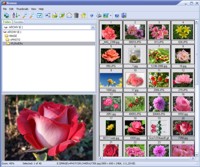
Click to enlargeDescription:Able Image Browser is a full featured image viewing solution which is fast, simple-to-use and inexpensive. Able Image Browser features: Supports all common image formats: JPEG (JPG and JPE), GIF, Bitmaps (BMP, RLE and DIB), TIFF (TIF and FAX), Metafiles (WMF and EMF), Icons (ICO), PNG, PCX, TGA (TARGA, VDA, ICB, VST, PIX), PBM, PGM and PPM Converting to Adobe PDF, PostScript PS, EPS, Wireless bitmap. Thumbnails display with support for memory and disk caching Images can be added to favorites for later viewing or saving as an image collection Advanced thumbnail display, printing and exporting functionality Three printing modes: 1 - Print the currently Selected Image(s). 2 - Print All Images in the current folder. 3 - Print Thubmnails for all images in the current folder. Automatic choice of best orientation for printing Assigning of text descriptions to images Image manipulation functions including rotate, flip, crop, resize and various filters and effectsMultiple Copy / Rename Removing the Red Eye effect (caused by flash photography). Color adjusting. Color mode converting. Effects (Negative, Bupmap, Lens, Wave, Morph, User filter). Forwarding of images via e-mail All standard file and folder management functionality and image conversion featuresAuto Adjust OrientationFast editing (brightness, contrast, cropping) Able Image Browser is simple to use.
 | Price $ 19.95 / 19.95

Purchase Able Image Browser
Get it Now(to see additional options, click Buy Now) Type: Shareware File size: 4357 Kb Date: 02/02/2011 HomepageInstall support: Install and Uninstall OS: Win95, Win98, WinME, WinNT 3.x, WinNT 4.x, WinXP, Windows2000 System requirements: Pentium-400, 64 MB RAM Language: English Recent changes in this Major Update:+ Auto Adjust Orientation+ Size of Thumbnails+ Size of Preview area+ Default starting folder+ Fast editing (brightness, contrast, cropping)+ New command: Multiple Copy / Rename | |
|




