O in short: pshot of your video? The program lets you take snapshots directly from your movie. This means you can go to any point within a video clip capture a freeze frame picture and save this imagebest
|
 Categories Categories |
|
|
|
|
|
Able Video Snapshot 1.17.10.14 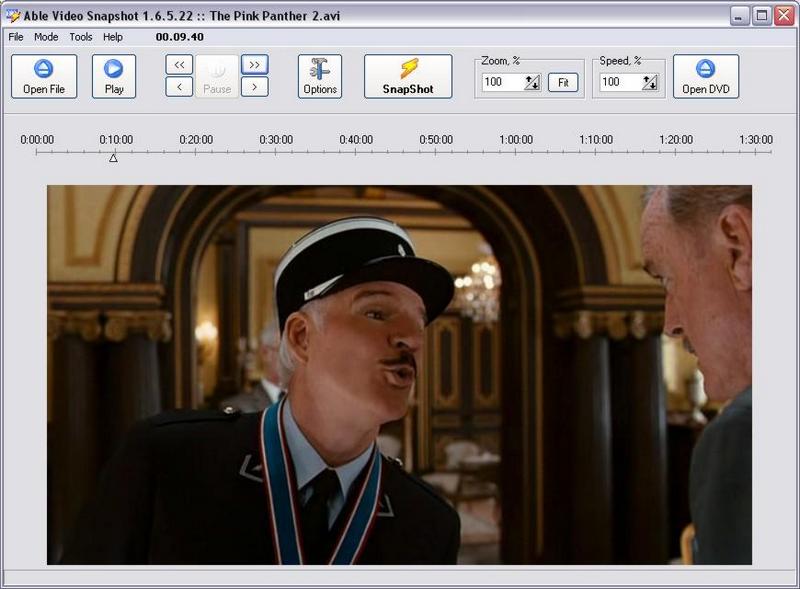
Click to enlargeDescription:How to take a snapshot of your video within Able Video Snapshot?The program lets you take snapshots directly from your movie! This means you can go to any point within a video clip, capture a freeze frame picture, and save this image to your computers hard drive.There are many uses for these snapshots.You can use these video pictures to create title slides. I like to find an interesting video scene that seems to symbolize my movie and capture a snapshot of it. You could also add a title directly to the picture using a photo-editing program. You could e-mail hi-light pictures of your video to friends and family. Not everyone can receive or view videos, so these pictures are a great alternative (and they don't take as long to download). You can also use the snapshot feature to transform your camcorder into a low-resolution digital camera. Simply point your camcorder at your subject and later you can go through your video and take virtual snapshots directly off the captured video. The actual process of taking these snapshot is quite easy. While viewing a video clip in the preview monitor, pause the clip at an appropriate spot, and click the "SnapShot" button under the preview monitor. Program will then ask you where you would like to save the picture.
 | Price $ 9.95 / 9.95

Purchase Able Video Snapshot
Get it Now(to see additional options, click Buy Now) Type: Shareware File size: 11064 Kb Date: 10/14/2017 HomepageInstall support: Install and Uninstall OS: Win2000, WinXP, Win7 x32, Win7 x64, Windows 8, Windows 10, WinServer, WinOther, Windows2000, Windows2003, Windows Server 2000, Windows Server 2003, Windows Server 2008, Windows Server 2008r2, Windows Server 2012, Windows Tablet PC Edition 2005, Windows Media Center Edition 2005, WinVista, Windows Vista Starter, Windows Vista Home Basic, Windows Vista Home Premium, Windows Vista Business, Windows Vista Enterprise, Windows Vista Ultimate, WinVista x64, Windows Vista Home Basic x64, Windows Vista Home Premium x64, Windows Vista Business x64, Windows Vista Enterprise x64, Windows Vista Ultimate x64 System requirements: Pentium-400, 64 MB RAM Language: English Recent changes in this Major Update:+ New feature: Color Adjust - Contrast, HSV, HSL, RGB, Equalization, FFT, Gamma correction, Sharpen("Edit" dialog box)+ New feature: Effects - User filter, Bump map, Lens, Wave, Morphing filters, Rotate("Edit" dialog box)+ New feature: Auto Equalize ("Edit" dialog box)+ New feature: Undo ... | See also in:
| Multimedia and Productivity: Multimedia and Productivity:Video Editors Mixers Conversion | |  | An ultimate video and audio format converter which supports converting APE, CUE, CDA, h.264, MPEG, AVI, MPG, DVD, VCD, WMV, MP4, MOV, 3GP, DivX, animated GIF, RM and ASF etc to MPEG and AVI. |
| |  | Video and audio converter which supports DVD, VCD, SVCD, VOB, AVI, DV, MOV, animated GIF, swf, MPEG4, RM, WMV, ASF, WAV, WMA, MP3, 3GP, m4a, mp4, h264, raw YUV, MP2, ogg, m4v etc. It allows users to convert any segments and supports multi-language |
| |  | Tipard HD Video Converter can convert HD video to MP4, MKV, AVI, WMV, MOV, M4V and more. It also can convert 4K videos to 4K video like 4K H.264 TS, 4K AVI, and 1080p HD video files to HD MOV, HD AVI, HD WMV, HD MP4. It is compatible with windows 10. |
|
|
|




