Software:

Featured: NoClone
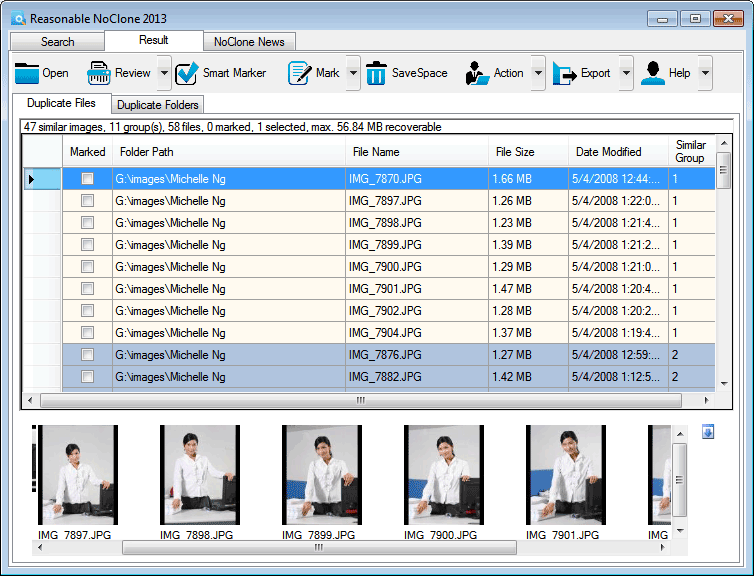
NoClone NoClone - Find and Remove TRUE duplicate files.
Byte-to-byte comparison. Smart deletion. Clean up hard drive. More info - Download - Get it now!
|
|
Featured: AttributeMagic Pro
AttributeMagic Pro Changes file/folder date-time and attributes en masse. You can set/reset attributes, Accessed, Modified, Created dates, JPEG/EXIF metadata, MS Office document properties, NTFS streams. Date-time shifting, masking, assignment, directory printing. More info - Download - Get it now!
|
|
Soft14:
| |  | Handy Explorer - powerful file management software for your Sony Ericsson P910 / P900 / P800, BenQ P30 and Motorola A925. See also: file tool, manager tool, epocware tool, handy tool, explorer tool, p800 tool, p900 tool, drive tool, folder tool, ...
[ Download Handy Explorer for Sony Ericsson - Get Handy Explorer for Sony Ericsson now - More info about Handy Explorer for Sony Ericsson ] |
| |  | Haizon File Renamer - is industrial-level File Sorter, File Organizer, File Renamer, that will sort, organize, rename all files, fast and easy. Support MP3,AVI,DIVX,OGG,MPEG,JPG,ZIP,RAR and HUNDREDS of other formats. High speed, flexible settings. See also: file sorter tool, file organizer tool, file renamer tool, renamer tool, organizer tool, sorter tool, sort tool, organize tool, rename tool, ...
[ Download Haizon File Renamer - Get Haizon File Renamer now - More info about Haizon File Renamer ] |
| |  | HDDlife is a real-time hard drive monitoring utility with alerts, malfunction protection and data loss prevention functions. This hard drive inspector is a proactive hard drive failure detection system which manages all of your hard drive risks. See also: hard drive tool, hard tool, hard disk tool, life tool, failure tool, malfunction tool, estimate tool, temperature tool, tray tool, ...
[ Download HDDlife - Get HDDlife now - More info about HDDlife ] |
|
Suggested software:

EasyWebEditorA professional and easy to use software for creating your own Web site.
|
|
| |  | HDDScan is a freeware program for low-level HDD diagnostics. HDDScan supports IDE/SATA/SCSI hard disk drives, RAID arrays, external USB/Firewire hard disks, flash cards. See also: SMART tool, Scan tool, Acoustic Management tool, Hard Disk Drive tool, Stop spindle tool, Power Management tool, Erase Disk tool, Zero Fill tool, ...
[ Download HDD Scan - Get HDD Scan now - More info about HDD Scan ] |
| |  | Can detect a lot of hard drives troubles and give a solution for them: - Monitor hard drives health, performance and temperature; - Defragmemt and clean hard drives and registry; Show hdd activity, temperature, performance and health in tray icons See also: SMART tool, hard drive tool, hdd monitor tool, disk cleaner tool, registry cleaner tool, defragment tool, defrgamenter tool, ...
[ Download HDD Observer - Get HDD Observer now - More info about HDD Observer ] |
| |  | The Free Edition of HDClone is the ideal tool for cloning, migrating and imaging contents of internal/mobile hard disks, SSD and USB media. Since it works on physical level, it can be used with any operating system and any filesystem. See also: hard tool, disk tool, drive tool, harddrive tool, harddisk tool, copy tool, clone tool, move tool, backup tool, ...
[ Download HDClone Free Edition - Get HDClone Free Edition now - More info about HDClone Free Edition ] |
| |  | Guiffy is a visual file compare diff tool, folder compare, and merge tool. Guiffy is a cross-platform application and component available for Windows, MacOS, Linux, and Unix platforms. This download includes an easy-to-use Windows installer. See also: diff tool tool, merge tool tool, folder compare tool, 3 Way Merge tool, visual file compare tool, ...
[ Download Guiffy eXpert Windows - Get Guiffy eXpert Windows now - More info about Guiffy eXpert Windows ] |
| |  | |
| |  | |
See also the other sections: Utilities, Hardware File, Disk Management section 1, Utilities, Hardware File, Disk Management section 2, Utilities, Hardware File, Disk Management section 3, Utilities, Hardware File, Disk Management section 4, Utilities, Hardware File, Disk Management section 5, Utilities, Hardware File, Disk Management section 6, Utilities, Hardware File, Disk Management section 7, Utilities, Hardware File, Disk Management section 8, Utilities, Hardware File, Disk Management section 9, Utilities, Hardware File, Disk Management section 10, Utilities, Hardware File, Disk Management section 11, Utilities, Hardware File, Disk Management section 12, Utilities, Hardware File, Disk Management section 13, Utilities, Hardware File, Disk Management section 14, Utilities, Hardware File, Disk Management section 15, Utilities, Hardware File, Disk Management section 16, Utilities, Hardware File, Disk Management section 17, Utilities, Hardware File, Disk Management section 18, Utilities, Hardware File, Disk Management section 19, Utilities, Hardware File, Disk Management section 20, Utilities, Hardware File, Disk Management section 21, Utilities, Hardware File, Disk Management section 22, Utilities, Hardware File, Disk Management section 23, Utilities, Hardware File, Disk Management section 24, Utilities, Hardware File, Disk Management section 25, Utilities, Hardware File, Disk Management section 26, Utilities, Hardware File, Disk Management section 27, Utilities, Hardware File, Disk Management section 28, Utilities, Hardware File, Disk Management section 29, Utilities, Hardware File, Disk Management section 30, Utilities, Hardware File, Disk Management section 31, Utilities, Hardware File, Disk Management section 32, Utilities, Hardware File, Disk Management section 33, Utilities, Hardware File, Disk Management section 34, Utilities, Hardware File, Disk Management section 35, Utilities, Hardware File, Disk Management section 36, Utilities, Hardware File, Disk Management section 37, Utilities, Hardware File, Disk Management section 38, Utilities, Hardware File, Disk Management section 39, Utilities, Hardware File, Disk Management section 40, Utilities, Hardware File, Disk Management section 41, Utilities, Hardware File, Disk Management section 42, Utilities, Hardware File, Disk Management section 43, Utilities, Hardware File, Disk Management section 44, Utilities, Hardware File, Disk Management section 45, Utilities, Hardware File, Disk Management section 46, Utilities, Hardware File, Disk Management section 47, Utilities, Hardware File, Disk Management section 48, Utilities, Hardware File, Disk Management section 49, Utilities, Hardware File, Disk Management section 50, Utilities, Hardware File, Disk Management section 51, Utilities, Hardware File, Disk Management section 52, Utilities, Hardware File, Disk Management section 53, Utilities, Hardware File, Disk Management section 54, Utilities, Hardware File, Disk Management section 55, Utilities, Hardware File, Disk Management section 56, Utilities, Hardware File, Disk Management section 57, Utilities, Hardware File, Disk Management section 58, Utilities, Hardware File, Disk Management section 59, Utilities, Hardware File, Disk Management section 60, Utilities, Hardware File, Disk Management section 61, Utilities, Hardware File, Disk Management section 62, Utilities, Hardware File, Disk Management section 63, Utilities, Hardware File, Disk Management section 64, Utilities, Hardware File, Disk Management section 65, Utilities, Hardware File, Disk Management section 66, Utilities, Hardware File, Disk Management section 67, Utilities, Hardware File, Disk Management section 68, Utilities, Hardware File, Disk Management section 69
|
|
Categories
|
|
|
|