Software:

Featured: NoClone
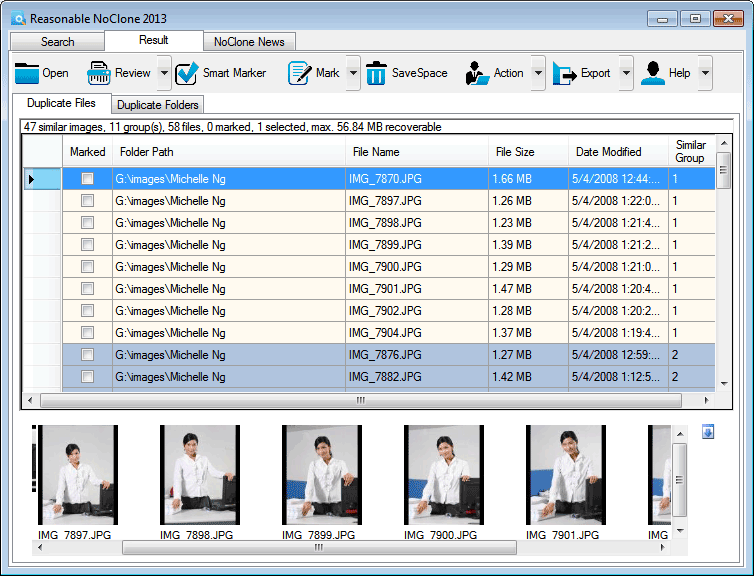
NoClone NoClone - Find and Remove TRUE duplicate files.
Byte-to-byte comparison. Smart deletion. Clean up hard drive. More info - Download - Get it now!
|
|
Featured: AttributeMagic Pro
AttributeMagic Pro Changes file/folder date-time and attributes en masse. You can set/reset attributes, Accessed, Modified, Created dates, JPEG/EXIF metadata, MS Office document properties, NTFS streams. Date-time shifting, masking, assignment, directory printing. More info - Download - Get it now!
|
|
Soft14:
| |  | Hard drive data recovery software is capable to recover deleted files and data from formatted partitions. Being a robust hard drive recovery software, this tool performs successful disk recovery and is compatible with Windows 7 98/ME/NT/2000/XP/2003. See also: data recovery tool, data recovery software tool, hard drive recovery tool, hard drive data recovery tool, hard drive recovery tool, hard drive recovery software tool, hard disk recovery software tool, file recovery software tool, disk recovery tool, ...
[ Download Data Recovery Software - Get Data Recovery Software now - More info about Data Recovery Software ] |
| |  | |
| |  | DVD Data Rescue is a effective data recovery software for damaged, scratched or defective CD/DVD/HD-DVD/BlueRay discs.It easily recovers unreadable, deleted or corrupted files.Full real support for UDF packet witting software. Free trial version. See also: DVD data rescue tool, recover tool, recovery tool, cd recover tool, dvd recover tool, lost tool, undelete tool, files tool, damaged tool, ...
[ Download DVD Data Rescue - Get DVD Data Rescue now - More info about DVD Data Rescue ] |
| |  | DIRlist prints file names and user descriptions of files and subdirectories. DIRllist provides free text descriptions to supplement the file name for project documentation, instruction manuals, and general identification of directory contents. See also: print directory tool, file description tool, files tool, directories tool, share tool, project documentation tool, instruction manual tool, directory contents tool, propagate tool, ...
[ Download DIRlist - Get DIRlist now - More info about DIRlist ] |
|
Suggested software:

EasyWebEditorA professional and easy to use software for creating your own Web site.
|
|
| |  | Cute Partition Manager is an advanced hard disk partition management utility. Using Cute Partition Manager, you can easily add, edit, delete and manage the partitions in your computer. Free product support is available at cutepm.com See also: cute tool, partition tool, manager tool, partitionmanager tool, partitionmanagers tool, partition manager tool, partition managers tool, ...
[ Download Cute Partition Manager - Get Cute Partition Manager now - More info about Cute Partition Manager ] |
| |  | This program adds a new command 'Copy Path to Clipboard' into the context menu for files, folders and drives. Pasting the complete filename or foldername is just a mouse click away. See also: Path tool, full tool, absolute tool, Filename tool, Foldername tool, File tool, Folder tool, Directory tool, Pathname tool, ...
[ Download Copy Path to Clipboard - Get Copy Path to Clipboard now - More info about Copy Path to Clipboard ] |
| |  | CoolAutoFormat is a program, with which you can format series of media and - if you want - fill them with data in one action. With CoolAutoFormat you are able to format a big pile of disks highly efficient or realize a small disk production. See also: format tool, formatting tool, copy tool, copying tool, fill tool, load tool, data tool, media tool, medium tool, ...
[ Download CoolAutoFormat - Get CoolAutoFormat now - More info about CoolAutoFormat ] |
See also the other sections: Utilities, Hardware File, Disk Management section 1, Utilities, Hardware File, Disk Management section 2, Utilities, Hardware File, Disk Management section 3, Utilities, Hardware File, Disk Management section 4, Utilities, Hardware File, Disk Management section 5, Utilities, Hardware File, Disk Management section 6, Utilities, Hardware File, Disk Management section 7, Utilities, Hardware File, Disk Management section 8, Utilities, Hardware File, Disk Management section 9, Utilities, Hardware File, Disk Management section 10, Utilities, Hardware File, Disk Management section 11, Utilities, Hardware File, Disk Management section 12, Utilities, Hardware File, Disk Management section 13, Utilities, Hardware File, Disk Management section 14, Utilities, Hardware File, Disk Management section 15, Utilities, Hardware File, Disk Management section 16, Utilities, Hardware File, Disk Management section 17, Utilities, Hardware File, Disk Management section 18, Utilities, Hardware File, Disk Management section 19, Utilities, Hardware File, Disk Management section 20, Utilities, Hardware File, Disk Management section 21, Utilities, Hardware File, Disk Management section 22, Utilities, Hardware File, Disk Management section 23, Utilities, Hardware File, Disk Management section 24, Utilities, Hardware File, Disk Management section 25, Utilities, Hardware File, Disk Management section 26, Utilities, Hardware File, Disk Management section 27, Utilities, Hardware File, Disk Management section 28, Utilities, Hardware File, Disk Management section 29, Utilities, Hardware File, Disk Management section 30, Utilities, Hardware File, Disk Management section 31, Utilities, Hardware File, Disk Management section 32, Utilities, Hardware File, Disk Management section 33, Utilities, Hardware File, Disk Management section 34, Utilities, Hardware File, Disk Management section 35, Utilities, Hardware File, Disk Management section 36, Utilities, Hardware File, Disk Management section 37, Utilities, Hardware File, Disk Management section 38, Utilities, Hardware File, Disk Management section 39, Utilities, Hardware File, Disk Management section 40, Utilities, Hardware File, Disk Management section 41, Utilities, Hardware File, Disk Management section 42, Utilities, Hardware File, Disk Management section 43, Utilities, Hardware File, Disk Management section 44, Utilities, Hardware File, Disk Management section 45, Utilities, Hardware File, Disk Management section 46, Utilities, Hardware File, Disk Management section 47, Utilities, Hardware File, Disk Management section 48, Utilities, Hardware File, Disk Management section 49, Utilities, Hardware File, Disk Management section 50, Utilities, Hardware File, Disk Management section 51, Utilities, Hardware File, Disk Management section 52, Utilities, Hardware File, Disk Management section 53, Utilities, Hardware File, Disk Management section 54, Utilities, Hardware File, Disk Management section 55, Utilities, Hardware File, Disk Management section 56, Utilities, Hardware File, Disk Management section 57, Utilities, Hardware File, Disk Management section 58, Utilities, Hardware File, Disk Management section 59, Utilities, Hardware File, Disk Management section 60, Utilities, Hardware File, Disk Management section 61, Utilities, Hardware File, Disk Management section 62, Utilities, Hardware File, Disk Management section 63, Utilities, Hardware File, Disk Management section 64, Utilities, Hardware File, Disk Management section 65, Utilities, Hardware File, Disk Management section 66, Utilities, Hardware File, Disk Management section 67, Utilities, Hardware File, Disk Management section 68, Utilities, Hardware File, Disk Management section 69
|
|
Categories
|
|
|
|